Contact Us

If you still have questions or prefer to get help directly from an agent, please submit a request.
We’ll get back to you as soon as possible.

Please fill out the contact form below and we will reply as soon as possible.

  • Alder Knowledge Base Home
  • Contact Us
  • Home
  • Cameras
  • Eufy Cameras
  • Eufy Indoor Camera

Mounting Your Eufy Indoor Camera

Updated at April 17th, 2026

Contact Us

If you still have questions or prefer to get help directly from an agent, please submit a request.
We’ll get back to you as soon as possible.

Please fill out the contact form below and we will reply as soon as possible.

  • Account
  • Alder Alula System
    Installation Preferences and Settings Using System Arming/Disarming System Troubleshooting History and Alarm Events
  • Luna Simple Panel
    Installation Preferences and Settings Using System Arming/Disarming System Troubleshooting History and Alarm Events
  • FAQ
  • Alder App
    Alder App- Troubleshooting
  • GC2 Panel
    Using the GC2 Panel Troubleshooting the GC2 Panel FAQ - GC2 Panel
  • Cameras
    Outdoor Camera - Alder Indoor Camera - Alder Doorbell Camera How to Use- Cameras Troubleshooting- Alder Camera Eufy Cameras
+ More

A Few Things to Know:  

  • Make sure to complete the entire pairing process before placing your camera.
  • If you wish to save recordings, a microSD card must be inserted.
  • This camera must be plugged into a standard AC power outlet to operate.
  • If you wish to place your camera high on a wall, you might consider installing an outdoor camera rather than an indoor camera, The outdoor camera does not require an outlet and comes with a mounting bracket.   

Selecting a Location

The camera can be placed on a table or shelf, or it can be mounted on a wall or ceiling
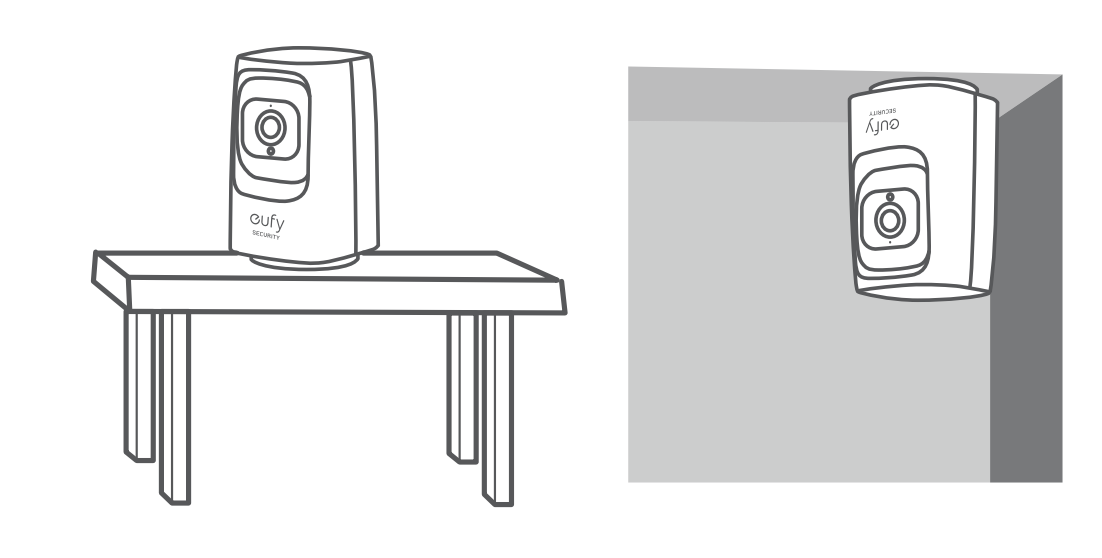
Keep the camera at least 0.7 ft / 20 cm away from walls or anything that may obstruct the view. This will help to prevent infrared reflection, which can harm the night vision performance.

Mounting the Indoor Camera on a Ceiling

  1. Place the positioning card against the ceiling and then mark the screw holes using a #2 pencil. 
  2. Drill holes with a 5/16” (8 mm) drill bit.
  3. Insert the anchors into the holes, align the holes on the mounting plate with those in the ceiling, and use a Phillips-head screwdriver to fasten the screws through the mounting plate to the ceiling.
  4. Align the grooves with the mounting plate and rotate the camera clockwise until it clicks into place.
  5. For any questions on mounting or installation not listed in this article, please refer to the quick start guide located in the packaging of your equipment or contact our support team for further assistance. 
eufy installing setup mount camera

Was this article helpful?

Yes
No

Related Articles

  • Eufy Camera Settings Guide
  • How to Download Clips from Your Eufy Camera in the Alder App
  • Pairing Your Eufy Indoor Camera with the Alder App

Services

  • Home Security
  • Home Security Cameras
  • Medical Alert Systems
  • My Account

Company

  • Careers
  • Contact
  • Verify Rep
  • About
  • Locations
800.710.1289

Copyright Alder Holdings, LLC

Privacy Policy | Licensing


br

Definition by Author

0
0
Expand